Build payments into your product.
One REST API for Mobile Money collections, payouts, airtime and settlements. Build against the sandbox, then go live with the same code.
- Get a token.
- Create a collection.
- Get a webhook.
cURL
curl -X POST "$API/v1/collections" \ -H "Authorization: Bearer $TOKEN" \ -H "Idempotency-Key: order-1042" \ -H "Content-Type: application/json" \ -d '{ "reference": "order-1042", "amount": "120.00", "currency": "GHS", "provider": "telecel", "payer": { "type": "msisdn", "value": "233000000001" } }'Node.js
const res = await fetch(`${API}/v1/collections`, { method: "POST", headers: { Authorization: `Bearer ${token}`, "Idempotency-Key": "order-1042", "Content-Type": "application/json", }, body: JSON.stringify({ reference: "order-1042", amount: "120.00", currency: "GHS", provider: "telecel", payer: { type: "msisdn", value: "233000000001" }, }),});Python
import requestsres = requests.post( f"{API}/v1/collections", headers={ "Authorization": f"Bearer {token}", "Idempotency-Key": "order-1042", }, json={ "reference": "order-1042", "amount": "120.00", "currency": "GHS", "provider": "telecel", "payer": {"type": "msisdn", "value": "233000000001"}, },)Response
HTTP/1.1 202 Accepted{ "reference": "order-1042", "status": "accepted", "amount": "120.00", "currency": "GHS", "provider": "telecel"}How a payment flows.
From your server to the payer's phone and back, in a few calls you can read.
Get a token
Swap your client ID and secret for an access token. It lasts five minutes.
POST /v1/oauth/tokenCreate a collection
Send the amount, the network and the payer's number. You get 202 straight back.
POST /v1/collectionsThe payer approves
The status moves from accepted to dispatched, then ends as settled, failed or expired.
accepted → dispatched → settledYour webhook fires
iSmartPay sends a signed POST to your server when the status changes.
collection.status_changed
GET/v1/collections/order-1042
- "status":"accepted"
- "status":"dispatched"
- "status":"settled"or failed, expired
POSTyour webhookcollection.status_changed
More than collections.
Send customers to a pay page you never have to build, charge them on a schedule, or hold money until an order is done.
Hosted checkout.
Create a checkout and send your customer to its link. They pay with MTN MoMo, Telecel Cash or their iSmartPay wallet, on a page with your name and colour.
POST /v1/checkouts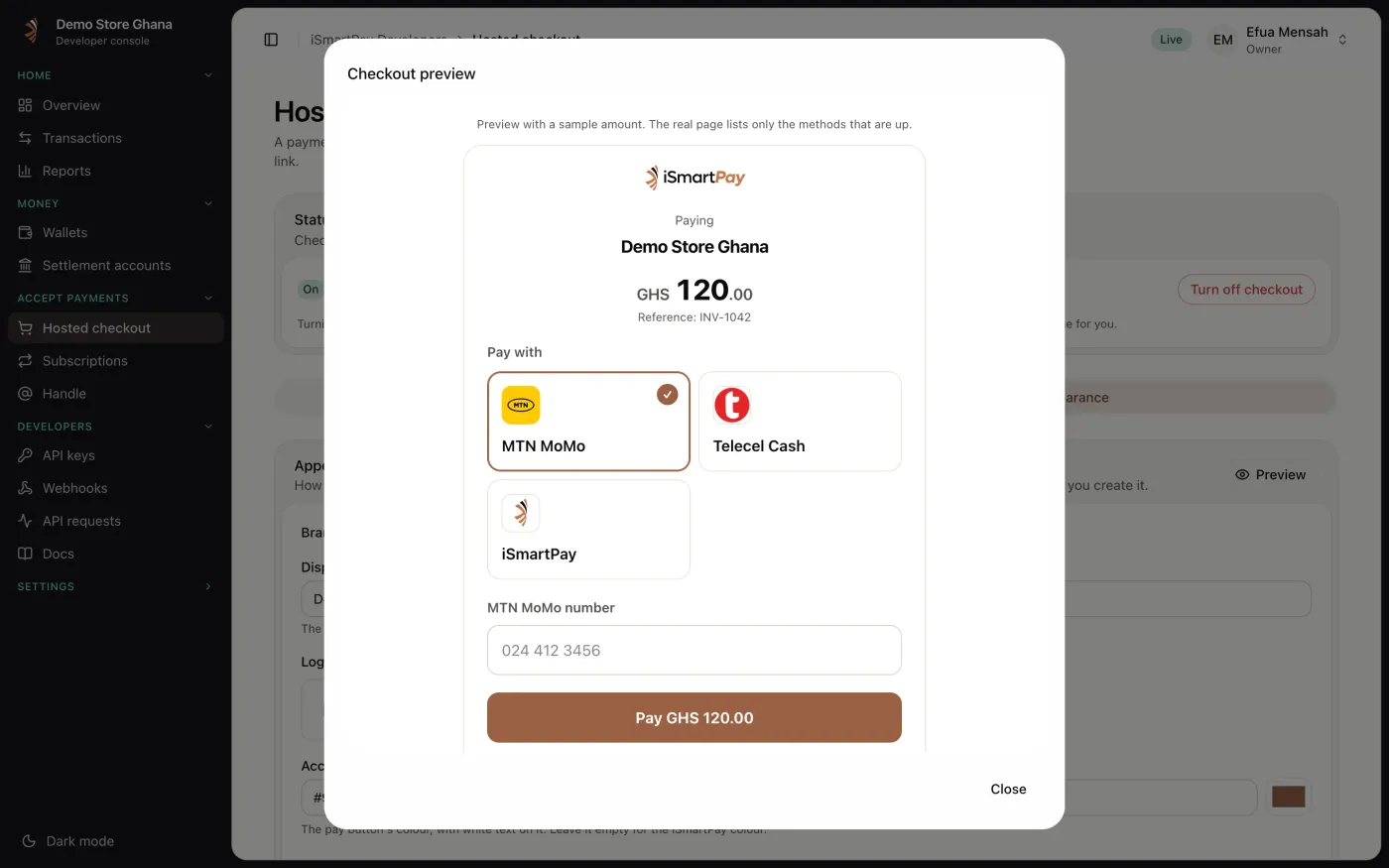
Subscriptions.
Charge a customer the same amount every day, week or month after they agree once. Pause, resume or cancel from the API or the portal. Ask us to switch subscriptions on for your business.
POST /v1/subscriptions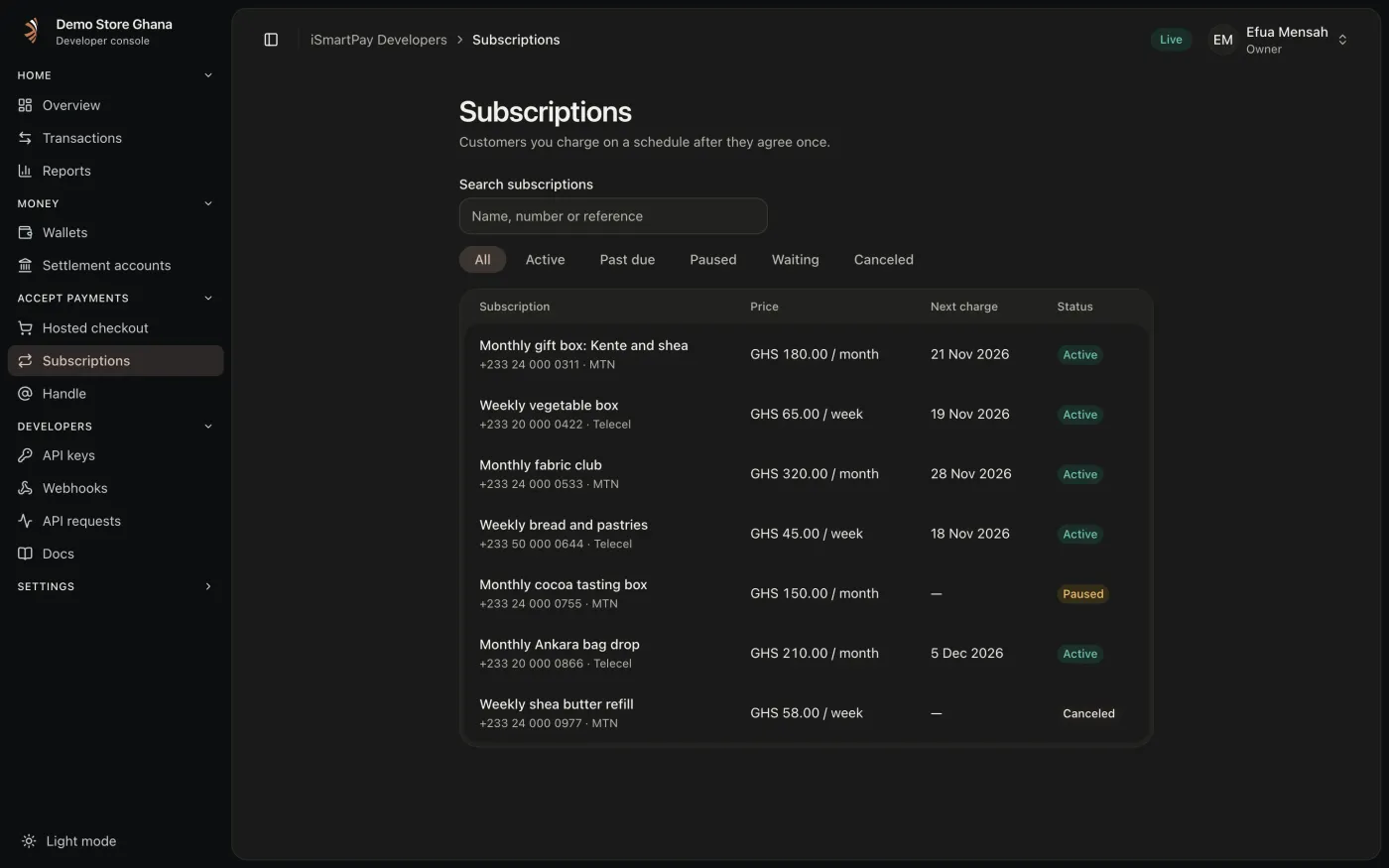
Escrow holds.
Set money aside for someone, then pay it to them or give it back. Built for marketplaces that pay sellers once the goods arrive.
POST /v1/holdsheldThe money is set aside for a seller, a branch wallet or a mobile money number.paid_outThe goods arrived. Pay it to them.returnedThe order fell through. Give it back.
Everything else in the API.
The pieces you reach for once payments are flowing.
Sub-accounts
Open another wallet of your business for each client or product. It sits under your one verification and your limits.
POST /v1/sub-accountsWallet moves
Shift money from one of your wallets to another in a single step.
POST /v1/wallet-movesPay by handle
Find another iSmartPay business by its @handle and send money straight to its wallet.
POST /v1/transfersPayment requests
Ask another iSmartPay account to pay you. They approve in the app or the Business console with their PIN, and nothing moves until they do.
payment_request.receivedPayout batches
Pay many people in one call. Each item is accepted or refused on its own, so one refusal doesn't stop the rest.
POST /v1/payout-batchesReversals
Undo a finished payment. The original is never edited: a second movement sends the money back and is linked to it.
POST /v1/payouts/{reference}/reversal-requestsDaily statements
Ask for any day and get each wallet's opening and closing balance, every transaction, and every escrow hold.
GET /v1/statements?date=Settlements
Set a settlement policy, see every settlement run to your bank, and follow each one by webhook.
PUT /v1/settlement-policy
The endpoints you will use.
Collections
- POST
/v1/collectionsAsk a payer to approve a payment - GET
/v1/collections/{reference}Check where a collection is - POST
/v1/fee-quotes/collectionsQuote the fee before you charge
Payouts
- POST
/v1/payoutsSend money to a mobile money number - POST
/v1/payout-batchesPay many people in one request - GET
/v1/payouts/{reference}Check a payout
Hosted checkout
- POST
/v1/checkoutsCreate a pay page and send your customer to it - GET
/v1/checkouts/{checkoutId}Check whether it was paid - PUT
/v1/checkout/appearanceSet your name, colour and payment methods
Subscriptions
- POST
/v1/subscriptionsCharge a customer on a schedule after they agree once - POST
/v1/subscriptions/{id}/pausePause, resume or cancel - GET
/v1/subscriptions/{id}/chargesEvery charge and its result
Escrow holds
- POST
/v1/holdsSet money aside for someone - POST
/v1/holds/{reference}/pay-outPay it to them - POST
/v1/holds/{reference}/returnGive it back
Wallets and sub-accounts
- POST
/v1/sub-accountsOpen another wallet for a client or product - POST
/v1/wallet-movesMove money between your own wallets - GET
/v1/statementsOne day of every wallet, ready to reconcile
Transfers and reversals
- GET
/v1/recipients/{handle}Look up a business by its handle - POST
/v1/transfersPay another iSmartPay business - POST
/v1/payouts/{reference}/reversal-requestsAsk to undo a finished payout
Airtime and data
- GET
/v1/utility-productsList what you can sell - POST
/v1/utility-purchasesBuy airtime or data for a number
Money and records
- GET
/v1/walletYour balance - GET
/v1/settlementsSettlement runs to your bank - GET
/v1/transactionsEvery movement on your account - GET
/v1/eventsEvents, if you would rather poll
Webhooks you can trust.
When a payment changes, iSmartPay sends a signed POST to your HTTPS endpoint, so you never have to poll. Each delivery carries a Webhook-Id, a timestamp and an HMAC-SHA256 signature to check before you act.
- collection.accepted
- collection.status_changed
- payout.accepted
- payout.status_changed
- checkout.paid
- subscription.charge_succeeded
- hold.status_changed
- utility_purchase.status_changed
- settlement.status_changed
- transfer.received
- transfer.status_changed
- payment_request.received
import { createHmac, timingSafeEqual } from "node:crypto";const signed = `${id}.${timestamp}.${rawBody}`;const expected = createHmac("sha256", secret) .update(signed) .digest("base64");const given = header.replace("v1,", "");const ok = timingSafeEqual(Buffer.from(given), Buffer.from(expected));Set up in the portal.
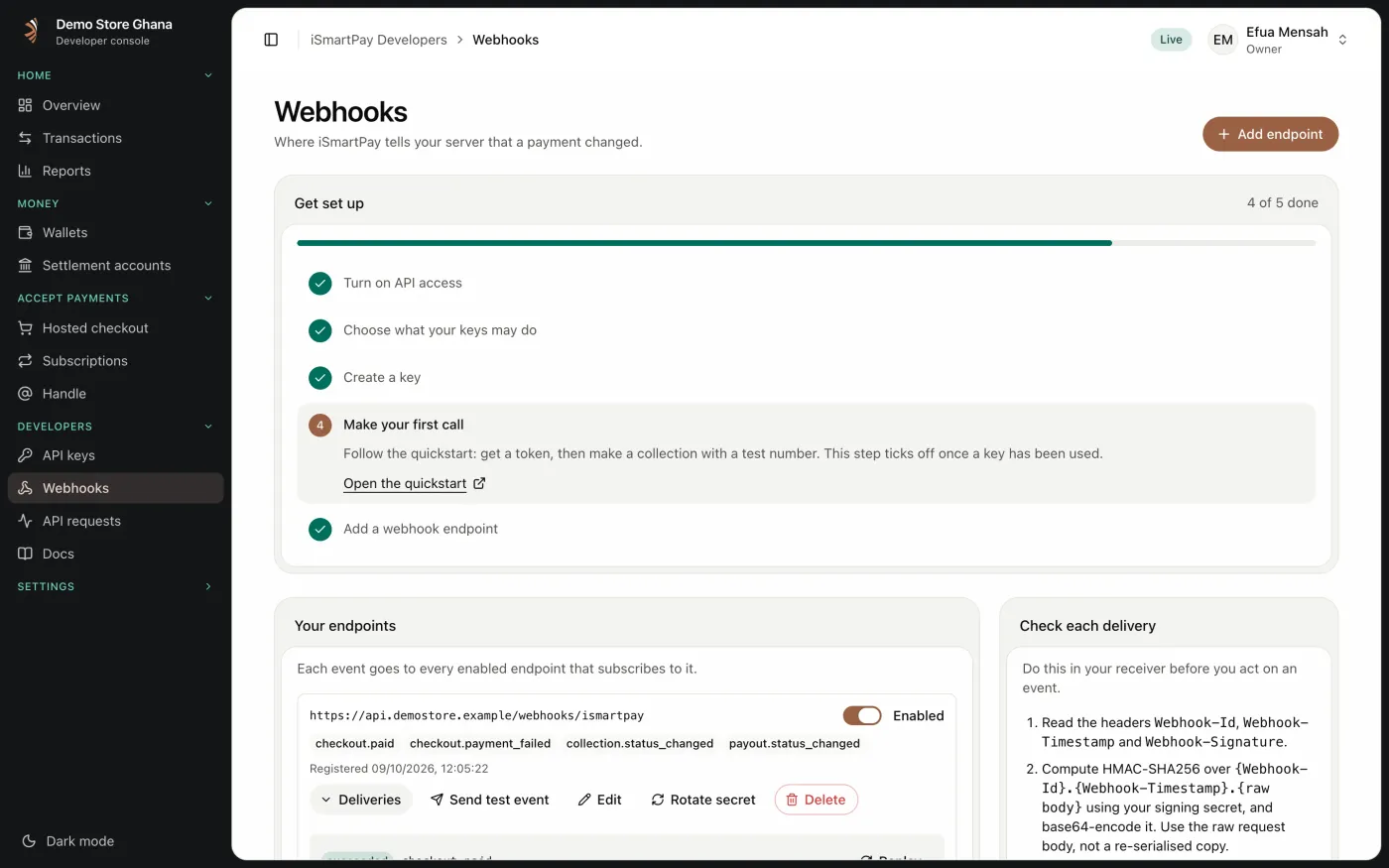
A setup guide walks you from API access to your first webhook. Each endpoint shows its events and every delivery, with retries, so you can send a test event and watch it land.
Built to be predictable.
Safe to retry
Send an Idempotency-Key with every write. Retry the same request and you get the same result, never a double charge.
Idempotency-Key: order-1042Errors you can act on
401Get a new token409You reused a key with a different body429Comes with Retry-After
See every call you make.
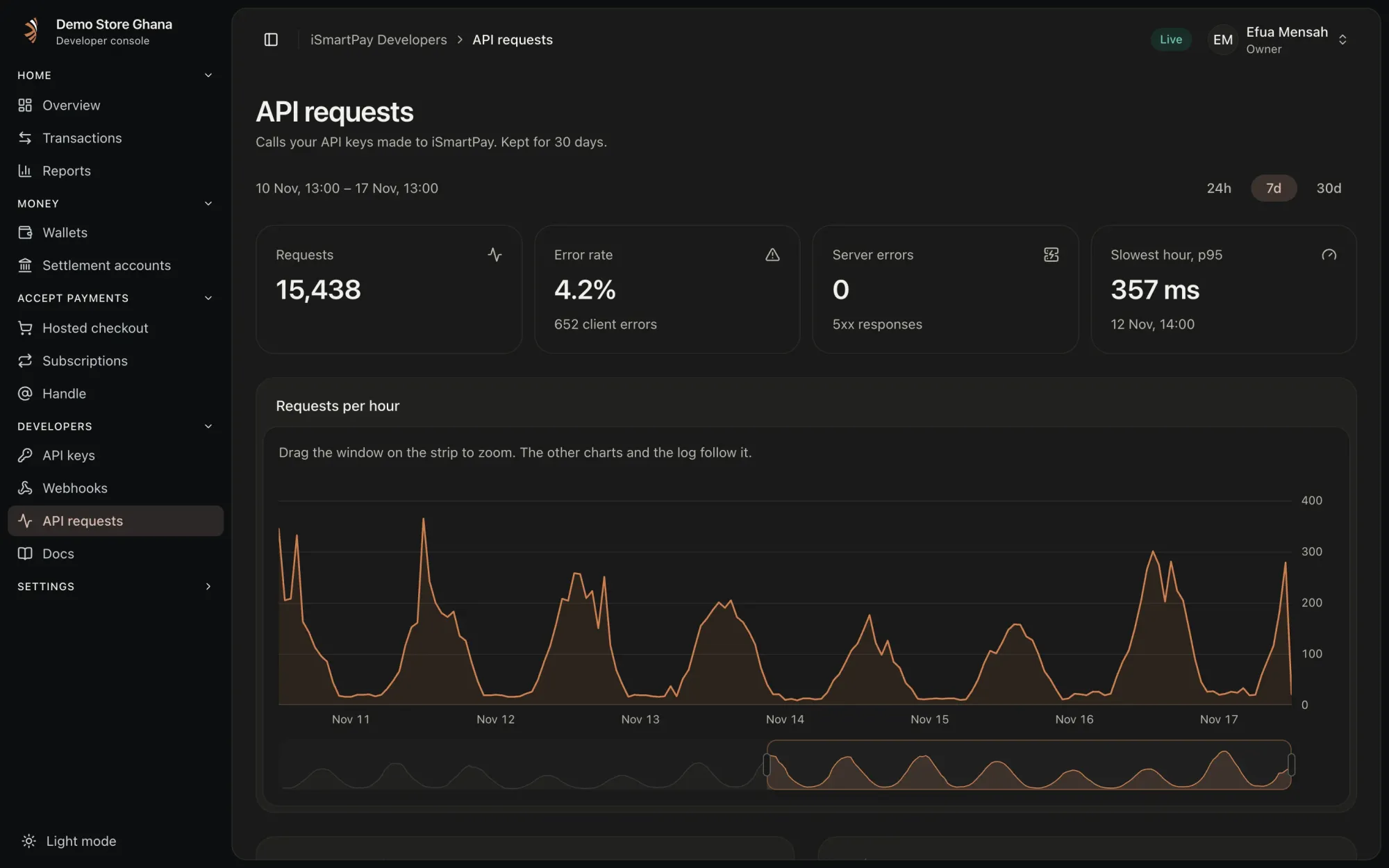
The developer portal shows your traffic, error rate and latency, every request with its status, and your test and live keys.
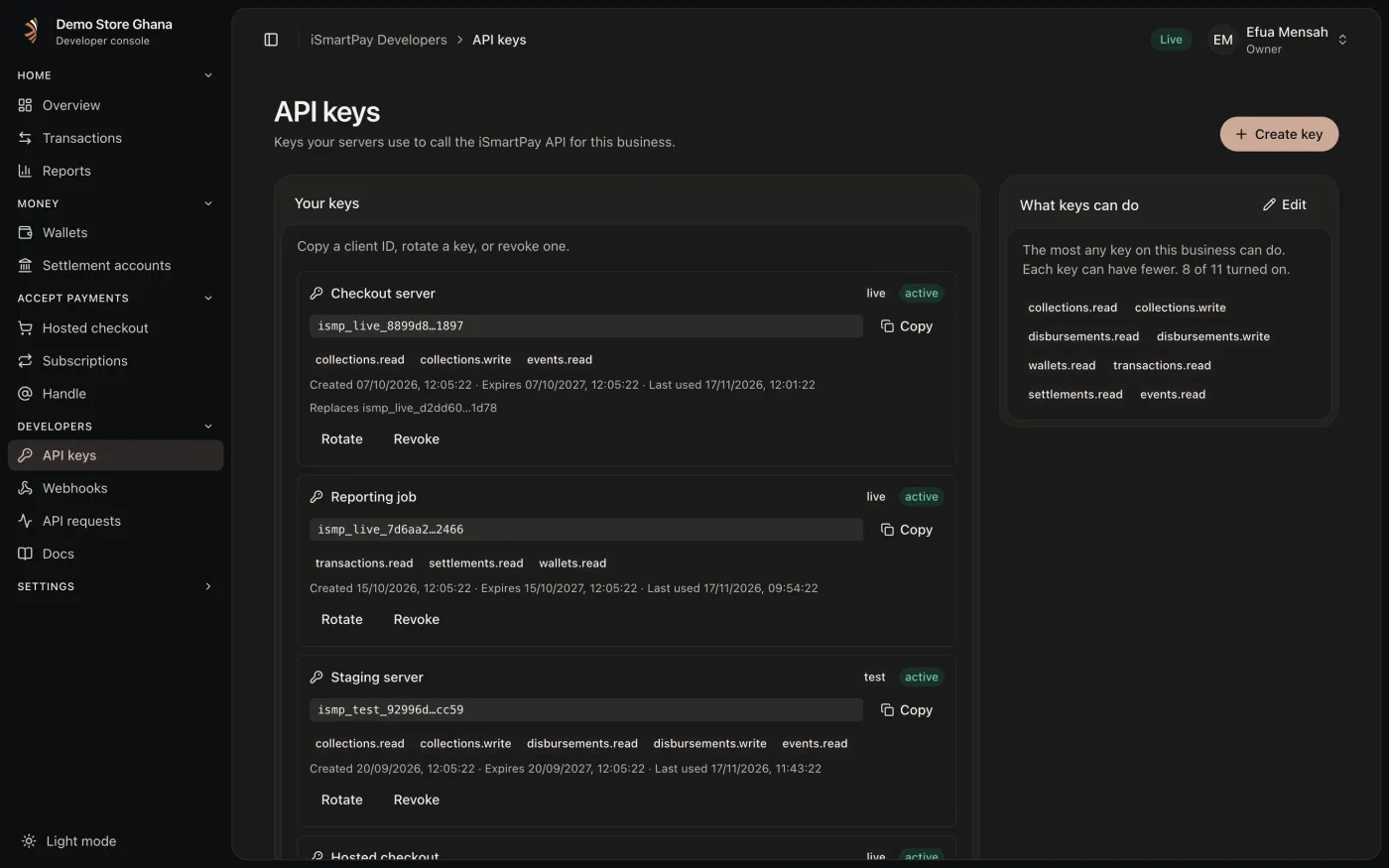
From sandbox to live.
Build against the sandbox, then go live with the same code.
- test
Create a test key
Create a business account on the developer portal, open API keys and create a test key. The client secret is shown once, so store it safely.
- sandbox
Build against the sandbox
Test keys, test numbers and the same endpoints. Nothing you do in test moves real money.
- live
Go live once you are verified
Verify your business in the live portal: confirm your phone, add your owners and your TIN, and answer a few risk questions. Then create live keys and point your code at the live base URL. Test and live keys, endpoints and webhook secrets are kept separate.
Questions developers ask.
How do I get API access?
Create a business account on the developer portal, open API keys and create a test key. The client secret is shown once, so store it safely.
How long does an access token last?
Five minutes. Request a new one with your client credentials when it expires.
How do I test without real money?
Use a test key against the sandbox, with the test numbers listed in the sandbox guide. Test and live keys, endpoints and webhook secrets are kept separate.
How do I know a payment finished?
Register a webhook and listen for collection.status_changed, or fetch the collection by its reference. A collection ends as settled, failed or expired.
When can I go live?
Once your business is verified. You then create live keys in the live portal and point your code at the live base URL.
Start with a test key.
Create a business account on the developer portal, open API keys and create a test key.